OFFBIT M1 Announced – E-Paper Display for Lens Charts, Crew Lists and Notes, Three-Week Battery
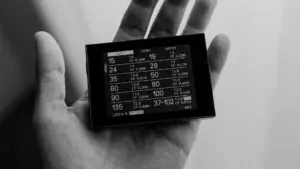
Barcelona-based startup OFFBIT has announced the M1, a small e-paper display for the camera department that replaces the paper lens chart on the camera body. It also holds the crew list, notes and a gallery of custom images, and everything is set up in a free iOS app. The first batch is limited to 100 units, and pre-orders open on November 11. Let’s take a look at what it offers.
Most camera departments still tape a printed lens chart to the camera or keep it in the AC’s pouch, next to a folded crew list and handwritten notes. The OFFBIT M1 puts that information on one small screen that mounts on the camera body or beside a monitor. OFFBIT founder Bernat Eguiluz, a working cinematographer, started the company in Barcelona in October 2025, and the M1 is its first product. According to OFFBIT, the M1 began as a prototype and was refined on productions with the help of focus pullers and 2nd ACs. Camera assistants are the main users.
OFFBIT M1 showing the LENS page. Image credit: OFFBIT
E-paper is not new to filmmaking gear; we saw an E-Ink status screen on the Insta360 Mic Pro earlier this year. The M1 is, however, a dedicated reference display with no camera or recording function. It shows lens data, the crew list and notes, and the content comes from a free iPhone app over Bluetooth.
Three pages: lens, crew and notes
Three buttons along the top edge switch between the LENS, CREW and NOTES pages. OFFBIT’s press images show the LENS page as a grid of focal lengths, each with its T-stop and close-focus distance, plus the name of the lens set at the bottom. The CREW page lists names, roles and departments, and according to the OFFBIT website, the app can scan a call sheet to fill it in. NOTES is a free-form page for shot lists, radio channels or equipment lists, and the app can also scan a shooting plan into it.
A long press on the center button opens the patch gallery. It holds up to 25 custom images, such as production logos or crew photos. The app converts any i
Comments
No comments yet. Be the first to share your thoughts.