Quest's Latest PTC Brings Streamlined OS Interface & Theater Environment
The Horizon OS 2.10 (v210) system software update recently started rolling out in the PTC (Public Test Channel).
What Is the Public Test Channel (PTC)?
The Public Test Channel (PTC) is Meta Quest's beta release channel. If you opt in, your headset receives a pre-release build of each version of Quest's system software, now technically called Horizon OS.
Note that there are often features in the eventual stable version not present in the PTC, and occasionally (but rarely) features or changes in the PTC don't make it to the stable version. Even when an update supports a feature, individual headset owners may not gain access for weeks or months after it’s announced, while some features quietly roll out to select users as experiments without ever being officially mentioned.
Meta also sometimes describes features inaccurately or lists features as rolling out with a particular PTC or stable version despite them actually being planned for a later release. Some features are announced but then delayed without notice, only to reappear in later announcements.
Theater Environment
0:00
/ 0:32
1×
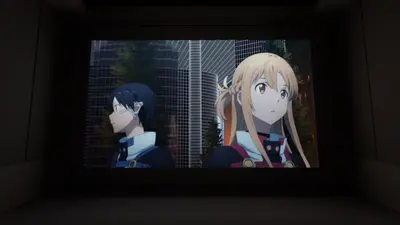
Consistent with UploadVR's previous reporting , Horizon OS 2.10 PTC introduces a brand-new environment called Theater. It features a large home theater-style room with high-resolution textures.
Rather than being a traditional VR Home environment, Theater is selected from the Control Bar of the window you want to display on the center screen, using a new button labeled 'Theater', separate from the existing Focus View.
Selecting it switches the system to Theater, and exiting the space returns you to the traditional VR Home environment or Passthrough. The environment appears to be compatible with most media-focused window apps. So far, I've confirmed that it works with the system Media Player, Browser, YouTube, Disney+, and Amazon Prime Video.
The current version of Theater appears to use real-time dynamic lighting based on the content being played. However, it does not appear to inc


Comments
No comments yet. Be the first to share your thoughts.