iVANKY FusionDock Ultra Review – 26 Ports, 10GbE and a Dual-Cable Design for the Mac Desk
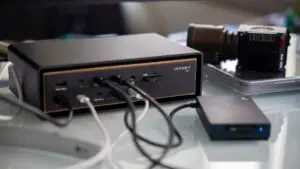
I constantly run out of ports on my MacBook Pro. My desk is full of RAIDs, card readers for various camera memory cards, an iodyne Pro Data and two high-resolution monitors, and every single one of them wants a cable. The iVANKY FusionDock Ultra promises to take all of that off the laptop: 26 ports, 10GbE, two host connections and up to four native displays on the right Mac. I put it to work on my M2 Max MacBook Pro, with card offloads, a 10GbE NAS and two monitors, and for a desk like mine, it is the perfect companion.
The FusionDock Ultra sits at the top of iVANKY’s FusionDock line, above the FusionDock Max 1 and Max 2. We first covered the company back in 2020 with a USB-C dock for dual 4K displays on the MacBook Pro , and displays are still the reason this dock exists. iVANKY puts two dock controllers into one housing and connects both of them to the Mac with two cables. The result is made for Apple silicon Macs only, running macOS 15.1 or later. It does not work with Windows PCs, Chromebooks or Intel Macs. This is not a full lab review; it’s my experience with the dock in my own edit setup, plus a set of measurements on the card reader and the network port.
iVANKY FusionDock Ultra. Image credit: CineD
Two cables, two chips
iVANKY calls it a “Dual-Chip architecture.” Each of the two host ports feeds its own controller, and each controller serves its own group of ports, including one of the two rows of display outputs on the back. The included cable ends in two USB-C plugs that snap together magnetically. On a MacBook Pro, they go into the two ports on the left side as one unit; on a Mac mini or Mac Studio, you pull them apart to reach ports that sit further apart.
The price for this is obvious: the FusionDock Ultra is not a one-cable dock, and it takes two of the three Thunderbolt ports on my MacBook Pro. For a laptop that lives on a desk most of the time, I can live with that, because the Mac’s own HDMI port, SD slot and the right-hand Thunderbolt port sta


Comments
No comments yet. Be the first to share your thoughts.