Canon Camera Control Centre Announced – Free Multi-Camera Software for PTZ and Cinema EOS, Up to 200 Cameras
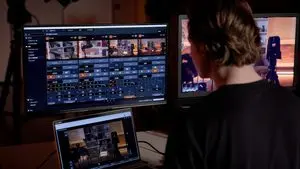
Canon has announced Camera Control Centre, a free computer application that puts setup, PTZ control, color matching, firmware updates and batch settings for up to 200 Canon cameras into one window. It replaces four separate Canon tools, adds a four-camera Quick Adjustments view, an angle-of-view simulator and saved multicam setups, and it supports Canon’s PTZ cameras as well as the EOS C400, C80, C50 and other Cinema EOS models. The Windows 11 version is due in early January 2027, with macOS to follow.
Canon announced Camera Control Centre on November 4, and at first glance it reads like a pure broadcast and PTZ story. I think it is more relevant than that for many of our readers, because the supported device list also includes Cinema EOS cameras, and more and more small productions, live streams and corporate events now mix a Canon PTZ camera or two with an EOS C80 or a C50. Until now, such a Canon system needed up to four different applications: the Camera Search Tool for initial setup, the Remote Camera Control Application for PTZ control and presets, the Multi-Camera Management Application for firmware updates and camera settings, and the Camera Colour Matching Application for LUT-based color matching. According to Canon Europe , Camera Control Centre merges all four into one workflow, from planning and first setup to operation and maintenance.
This comes in the same week as Canon’s December firmware update for the EOS C400, C80 and C50 , which adds Multi Matrix color control, a feature Canon pitches for matching Cinema EOS feeds with studio cameras in live production. The direction is clear: Canon wants its cinema bodies and its PTZ line (we covered the CR-N350 and CR-N400 last year) to work as one multi-camera system.
Camera Control Centre’s Quick Image Adjust view with four camera feeds side by side, plus the five workflow stages Canon names. Image credit: Canon
Four apps become one
Canon’s English screenshots show how the application is organized. A Dev


Comments
No comments yet. Be the first to share your thoughts.