Director Mode App Released for iPhone and iPad – Four-Camera Monitoring, REC ALL, and USB-C Control for Canon and Sony
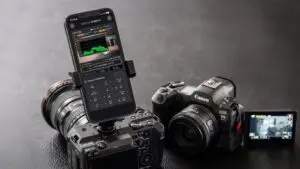
Director Mode is a new iPhone and iPad app that monitors and controls selected Canon and Sony cameras, and it can show up to four of them side by side, even when you mix the two brands. The app comes from a small team in Florence, Italy, connects over Wi-Fi, LAN or a direct USB-C cable, and adds a waveform, focus peaking, custom LUTs and a REC ALL button in its Pro version. Director Mode Basic is free, and Pro is a one-time in-app purchase.
We see a lot of camera control apps, but almost all of them stay inside one brand. Canon has its apps for Canon bodies, Sony has its apps for Sony bodies, and if you run a Canon EOS C50 next to a Sony a7 V on a small documentary or interview shoot, you normally end up with two phones, or with one phone and a lot of app switching. Director Mode tries to solve exactly that. According to the developer, filmmaker Claudio Ripalti and his crew built it out of practical needs on documentary and narrative sets, and more than 250 filmmakers took part in the beta program before version 1.0 went live on the Apple App Store last week.
Director Mode’s landscape monitor on an iPhone mounted on a Canon EOS C50. Image credit: Director Mode
One app for Canon and Sony
The app is not affiliated with or endorsed by Canon or Sony, so it works through the remote interfaces that the camera manufacturers already offer. Canon Cinema EOS cameras connect through Canon’s XC protocol over Wi-Fi or LAN, Canon EOS R cameras through the Canon Camera Control API (CCAPI) over Wi-Fi or USB-C, and Sony Alpha and FX cameras over Wi-Fi or USB-C. The developer’s compatibility page counts 26 camera models. Some of them need extra hardware: the Canon EOS C70, C300 Mark III and C500 Mark II require an external Wi-Fi adapter, and LAN on the Canon EOS C50 needs a USB-C to Ethernet adapter plus Canon’s DR-E6P DC coupler.
The supported Canon cameras are the EOS C50, C70, C80, C300 Mark III, C400 and C500 Mark II on the Cinema EOS side, plus the EOS R1, R5 Mark II, R6 Ma


Comments
No comments yet. Be the first to share your thoughts.