The $179 Magic Screen gives any MacBook a touchscreen with stylus support
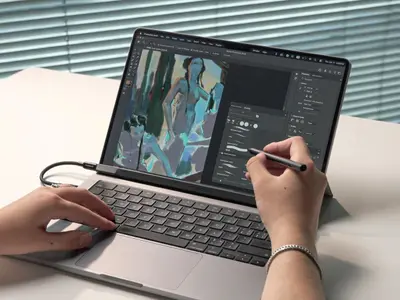
Hidden around a modern MacBook display are magnets used to tell the laptop you shut the lid. Intricuit, a small hardware startup, looked at those magnets and saw a free mounting system. Its Magic Screen uses them to snap a touch-sensitive glass panel over your display, adding tap, swipe, and pinch controls to the MacBook you already own. It costs $179 on Kickstarter. Apple’s approach is the new MacBook Pro with PROLED XDR Display , which starts at $2,899, or roughly sixteen Magic Screens with change left over for snacks. That’s a whole laptop rather than an accessory, but it’s a steep entry price if touch is all you’re after.
Apple integrates the touch sensor into a tandem OLED panel and uses a stiffer hinge designed to limit screen bounce when you tap it. It also supports zero styluses, Apple Pencil included, which is a little funny coming from the company that sells the Apple Pencil. The Magic Screen ships with a pen that reads 4,096 pressure levels, previews its tip position as it hovers, and supports palm rejection while you draw. Intricuit lists compatibility with M1 and newer MacBook Pros, M2 and newer Airs, and even the $599 MacBook Neo, bringing that last combination to $778.
Designer: Intricuit
Snap, Plug, Tap: How the Glass Registers Your Fingers
The panel is tempered glass with a capacitive digitizer built in, the same kind of touch technology your phone uses, tracking up to ten fingers at once. Intricuit lists transparency at 99% or better and a response time of 8ms. A single USB-C cable carries the touch data and draws a claimed 0.6 watts from your MacBook, so there’s no extra battery to babysit. The 14-inch MacBook Pro version weighs 4.3 ounces (122.8 grams), and the 16-inch version comes in at 6.1 ounces (172.6 grams). Basic touch works without the app; Intricuit’s software for macOS Sonoma or later adds further controls.
Tom’s Guide spent three weeks with a Magic Screen and came away convinced macOS is far more touch-ready than Apple ever let on
Comments
No comments yet. Be the first to share your thoughts.