Adobe MAX 2026: What’s New for Filmmakers and Video Editors
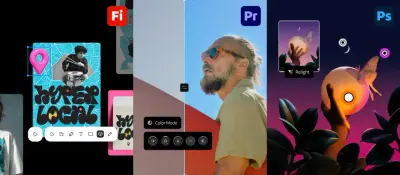
Adobe MAX has officially kicked off in Miami, Florida, as the company’s annual creativity conference begins, as always, with opening remarks from its leaders laying out what’s new in all things Adobe.
Obviously, Adobe touches a lot of the creation and design space, but we’ll do our best to help synthesize the latest news towards what might most affect the lives of filmmakers and, even more specifically, video editors. There’s also, of course, a whole new focus on the new era of multi-hyphenate, AI-assisted content creators, but we’ll do our best to cover what’s actually useful for most of us in the industry.
Let’s start with the big news from Adobe’s opening keynote and what’s coming to Creative Cloud at Adobe MAX 2026 , with a focus on Premiere and other video-adjacent creative areas.
Premiere Updates at Adobe MAX 2026
So, the headline news for most Adobe users might still be Photoshop, which, as you can imagine, is getting several new AI-powered tools and features, including new Relight, Generative Restyle, and Quick Compare tools.
These new Photoshop features often make their way downstream to other apps like Premiere and After Effects, so they’re worth keeping tabs on. But the big news for Premiere specifically is actually going to be some rehashes and improvements of some tools and features which we’ve covered in the past.
The biggest updates for Premiere introduced here at Adobe MAX 2026 will have to do with Color Mode, which Adobe introduced at NAB about half a year ago, and we covered at the time . Color Mode is now generally available and supports everything from quick corrections to more advanced grades while keeping your video as the focus.
Generative Media and Enhance Audio
The other big updates for Premiere include familiar functions, plus the Generative Media Tool, which brings Generate Video, Generate Sound Effects, Generate Soundscape, and Generate Music directly into the timeline.
Users can generate missing b-roll, background music, or sound for a


Comments
No comments yet. Be the first to share your thoughts.