Adobe Premiere can now sync your cameras, generate soundtracks, and make unwanted objects disappear – all thanks to AI
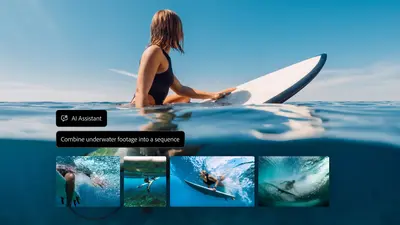
Adobe has announced a raft of new features for Premiere and After Effects at Adobe MAX 2026, with AI unsurprisingly taking center stage. There are plenty more ways to use Firefly to generate content, but this year, Adobe has also focused on using AI to take some of the more tedious jobs out of video editing.
Perhaps the most useful time saver is the expanded Adobe Creative Agent, which powers a new AI assistant in Premiere capable of handling complex editing tasks using simple conversational prompts. This includes organizing footage into bins, assembling sequences from the best takes, tracking subjects across frames, applying color corrections to multiple clips, and even syncing multiple cameras and audio recordings.
During a briefing ahead of Adobe MAX, I watched Adobe demonstrate the assistant syncing three camera angles and their audio into a fully editable multicam clip with a single instruction. Anyone who has spent hours manually syncing footage will certainly appreciate this new tool.
Editors can also create reusable AI "skills" to automate specific workflows, such as applying a studio's naming conventions or organizing footage in a particular way, while providing scripts, PDFs, and other documents gives the assistant additional context about a project.
(Image credit: Adobe ) Gen-AI comes to Premiere
Of course, Adobe's generative AI isn't far away, and Generative Remove is arriving in Premiere Beta. Using the existing object masking tools, editors can select and track unwanted objects before AI removes them and fills in the background, all without leaving the timeline or affecting the rest of the clip.
Adobe demonstrated this by removing a passing car from a video, although the feature could just as easily be used to remove an unwanted boom microphone or distracting logo. Of course, how convincingly it handles more complicated scenes remains to be seen.
Generate audio to match your video
(Image credit: Adobe) Premiere's Generative Media tools are also expan



Comments
No comments yet. Be the first to share your thoughts.