Siri Recap is live for Apple Watch — here's how to unlock the controversial new AI feature
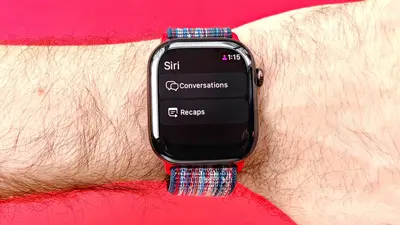
Apple's somewhat controversial new Audio Intelligence feature, Siri Recap, is now live in public beta for Apple Watch users. Best of all, you can try it yourself by following the five steps listed below.
As a refresher, Siri Recap ambiently listens to all of your conversations and uses AI to summarize major themes, important details, and key points. For privacy, users can set and control when the feature is active or not.
Siri Recap also never identifies individual speakers or saves any actual audio recordings. Better yet, all your data associated with Siri Recap is encrypted end-to-end.
With that said, here's how to enable Siri Recap on your Apple Watch and generate your own Apple Intelligence daily conversation summaries.
How to enable Siri Recap on your Apple Watch
Install iOS 27.3 beta on your iPhone and watchOS 27.3 beta on your Apple Watch
Open the Apple Watch app on your iPhone and select > Siri > 'Set up Siri Recap'
You’ll then be prompted to create a passcode; skip this step if you already have one
Toggle the Siri Recap switch on, then tap 'Enable Siri Recap'
Finally, set up a listening schedule and notification alerts
Read on to see full illustrated instructions for each step.
1. Install iOS 27.3 beta on your iPhone and watchOS 27.3 beta on your Apple Watch
(Image: © Future)
To enable Siri Recap on your Apple Watch, first d ownload and install iOS 27.3 beta on your iPhone. Then install watchOS 27.3 beta on your Apple Watch. Note: Only the latest Apple Watch models support this Apple Audio Intelligence feature, including the Ultra 4 and Series 12 .
2. Open the Apple Watch app on your iPhone and select > Siri > 'Set up Siri Recap'
(Image: © Future)
Next, open the Apple Watch app on your iPhone , scroll down and tap on Siri. Then scroll down and tap on “Set up Siri Recap.”
3. Create a passcode if you don't already have one
(Image: © Future)
You'll then be prompted to created a passcode if you don't already have one. Unfortunately, a passcode is mandator



Comments
No comments yet. Be the first to share your thoughts.