SlashVibe gives your AI tools their own spot on the desk
Many of us now work alongside AI tools all day. A coding agent runs in one window, a chat assistant sits in another tab, and a meeting recorder hums along somewhere in the background. Each one is useful on its own. Keeping track of all of them at once is where things get busy.
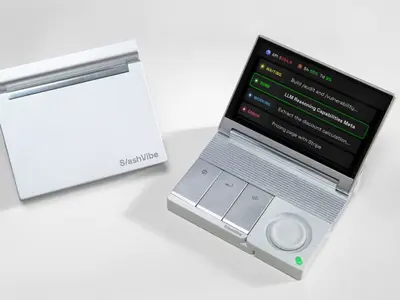
SlashVibe takes a fresh approach to that. It’s a dedicated AI workspace that sits beside your computer, with its own display, built-in voice input, and a detachable wireless controller. It connects to the AI tools you already use and gives them a physical home on your desk. Your main screen stays free for the work itself, and SlashVibe keeps the AI side of your day in view.
SlashVibe is now live on Kickstarter, and backers can reserve theirs today at $169.
A second screen built for one job
The centerpiece is a 3.96-inch LCD housed in sandblasted, anodized aluminum. It shows what your AI tools are working on and flags anything that needs your input. Think of it as a status board for your AI tools, small enough to sit next to your keyboard without crowding it.
Image Credits: SlashVibe
Close reading and detailed editing still happen on your computer. SlashVibe can now handle the quick check-in: you glance over, see what’s moving, and decide what needs your attention next.
The controller talks to the display wirelessly, and the display plugs into your computer with a USB-C. It works with macOS and Windows through the SlashVibe+ companion app, and it supports more than 20 AI agents and tools. That list includes Claude Code, Codex, Cursor, GitHub Copilot CLI, Gemini CLI, and OpenCode. If you’ve already settled into a favorite set of tools, chances are good SlashVibe works with them.
Your to-dos, with the AI work attached
This is the feature I find most interesting. SlashVibe lets you capture to-dos by voice, then add, update, or delegate work the same way. Each to-do can carry one or more AI tasks underneath it.
Say your list includes “Prepare a client proposal.” Beneath it, you might have


Comments
No comments yet. Be the first to share your thoughts.