Premiere Pro’s Color Mode Adds More Control for Editors Finishing Their Own Work
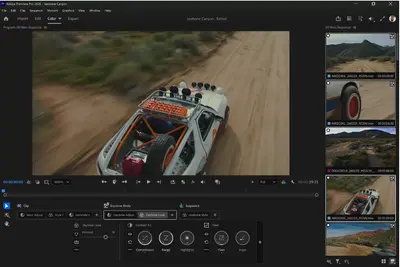
Color work often arrives at the end of the editorial process, whether or not the editor has time for it. The cut may be finished, but the footage still needs to be balanced. A log camera needs to sit alongside Rec. 709 material. An interview may need a small exposure correction, while the surrounding scene needs a more deliberate creative treatment. For editors working without a dedicated colorist, those tasks are part of the same delivery schedule as the final mix, captions, graphics, and exports.
That is the workflow problem Adobe Premiere’s Color Mode is designed to address.
Introduced in beta earlier this year, Color Mode provides a dedicated environment for color correction and grading inside Premiere. Since the initial release, Adobe has added tools that make the system more useful on real sequences: Auto Color, reanalysis and reset controls, new Midtones, Variable Vibrance, and Vignette modules, more flexible Style construction, and easier group management.
The overall direction has not changed. Color Mode is intended to let editors make broad, reusable decisions instead of rebuilding the same correction on every clip.
If you are new to the system, start with the article Why Adobe Rebuilt Color From Scratch . Then read Color Mode vs. Lumetri and Color Mode in Premiere: Setting Up for Success . For a deeper look at the workflow, see The Five Things Everyone Needs to Know About Adobe Color Mode in Premiere , The Clip Grid: A Different Way to Work , and Adjust vs. Style .
Auto Color provides a usable starting point
Auto Color is located within the Adjust operation and can automatically modify exposure and temperature/tint based on the frame at the playhead. Editors can also choose Auto Exposure or Auto White Balance separately. That makes it useful as a first-pass tool rather than a replacement for a final grade.
A difficult interview shot can be brought into a more workable range. A set of related clips can receive a shared correction before the editor b

Comments
No comments yet. Be the first to share your thoughts.