Adobe Premiere 27.0 Released – Color Mode, AI Assistant Panel, and Generative Audio Tools
Adobe has released Premiere 27.0 with Color Mode, an AI Assistant panel, and tools that generate music, sound effects, and soundscapes in the timeline. The update also retires the Lumetri Color panel, ends support for Intel Macs, and makes the AI Assistant draw Firefly credits with no cost estimate before a prompt runs.
The release arrives during Adobe MAX in Miami Beach. Adobe lists the changes in the Premiere 27.0 release post . Several of the features were in public beta since spring, and we covered the Color Mode beta when Adobe first showed it.
Color Mode replaces the Lumetri Color panel
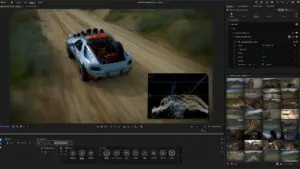
Color Mode is a dedicated grading workspace behind a new Color tab next to Edit. Adobe describes it as “a dedicated color-grading workspace designed to help you correct individual shots, create consistent looks, and manage color across an entire sequence.” It has a Clip Grid, three operation types (Adjust, Style, and LUT), and grades that apply to a clip, a group, or the complete sequence. A new HSL Masking tool isolates areas by hue, saturation, and luminance and combines with other masks.
The larger change is what goes away. In the Color Mode post , Adobe writes that “the Lumetri Color panel is being retired in Premiere 27.0,” while the Lumetri Color effect stays available and existing grades remain adjustable in Effect Controls. Adobe recommends that editors who are finishing a Lumetri-heavy project complete it in Premiere 26.x first. The company also notes that 8K media can have performance problems in an 8K sequence.
Style presets in Color Mode, the grading workspace that replaces the Lumetri Color panel. Image credit: Adobe
The first user replies under that post are about speed for small jobs. One editor objects that a fast exposure or white balance correction now needs the Color tab or a Lumetri effect on each clip, and another reports that the controls are too sensitive with a pen tablet.
The AI Assistant now uses Firefly credits
The AI Assistant panel reads the


Comments
No comments yet. Be the first to share your thoughts.