SlashVibe Gives AI Work a Dedicated Screen and a Detachable Voice Controller
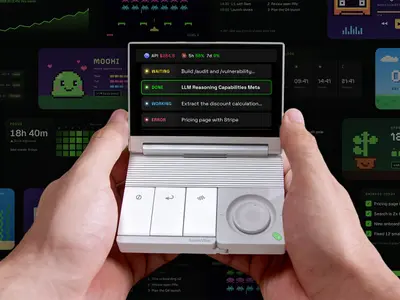
AI tools can help draft a proposal, gather references, and tackle the little jobs that eat into your day. Keeping track of all that activity, however, can become a job of its own. SlashVibe gives those tasks a dedicated spot beside your computer, pairing a small display with a detachable voice controller so checking progress doesn’t always mean opening another conversation.
SlashVibe takes a familiar shape, with a hinged, 3.96-inch LCD above a compact base. There’s no tiny keyboard demanding that you relearn typing with your thumbs. Instead, three action keys and a two-axis joystick handle the shorter interactions. Your computer remains the place for full documents and detailed edits, while SlashVibe is designed around checking, selecting, and responding.
Designers: Changliang Liu, Yitian Wu, Shijun Xu (dooo design)
Click Here to Buy Now: $169 $249 ($80 off). Hurry, only a few left! Raised over $68,000.
Take that client proposal, for example. Gathering references and preparing a first draft are related jobs, but they’re still separate pieces of work. Instead, SlashVibe organizes supporting AI tasks under the responsibility they belong to. That gives the screen a purpose beyond showing a collection of busy agents, keeping the project you’re responsible for connected to the work you’ve handed off.
As those agents work, the display shows which sessions are running, finished, or waiting for you. Selecting one can bring its associated window to the front on your computer, while supported permission requests can be handled directly on SlashVibe. The small screen helps you find the thing that needs attention, rather than pretending it should contain your entire working day.
When the draft needs a different emphasis, the next instruction can be spoken instead of typed. Built-in dictation turns that explanation into editable text, with cleanup and formatting designed to make it easier to read. Separate Send and Cancel controls keep speaking and submitting from becoming



Comments
No comments yet. Be the first to share your thoughts.