Motorola MA2 Adds a Phone-Switching Button to Wireless Android Auto
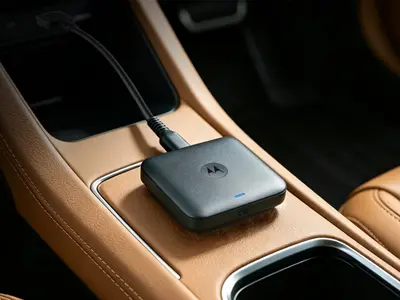
Plugging a phone into the car is hardly a chore, until you do it every time you drive. The Motorola MA2 wireless Android Auto adapter lets that phone stay in your pocket, while adding something useful to its small black box: physical controls for changing phones and switching the connection off. Sometimes the most welcome upgrade is having a little less happen automatically.
The body is a flattened square with rounded corners, a dark finish, and a small status light near one edge. There’s no screen competing with the dashboard and no reason to make it a centerpiece. The restrained shape suits something that lives beside a console’s USB port, although its buttons need to remain accessible if you’re going to reach them without rummaging.
Designer: Motorola , Google
A USB-C socket gives the adapter a detachable connection, with both USB-C-to-USB-A and USB-C-to-USB-C cables included. That matters when cars put their ports in awkward recesses or switch between connector types. The supplied gel pad provides a way to secure the little box in place, too, rather than leaving it sliding around among coins and charging cables every time you turn a corner.
Setup still starts with a car that already supports wired Android Auto. This isn’t a shortcut for adding Google’s interface to an incompatible stereo. You plug the adapter into the appropriate USB port, pair a compatible phone through Bluetooth, and use 5 GHz Wi-Fi for the wireless connection. Motorola says subsequent connections happen automatically, without repeating that whole initial pairing routine.
Sharing the car gives the switching button a reason to exist. The MA2 can keep two phones paired, letting you choose which driver’s phone supplies Android Auto without starting setup again. If your partner drove yesterday and you’re taking over this morning, that handoff could happen with a button press before departure. It doesn’t mean running two separate navigation sessions on one display.
The power switch deals with
Comments
No comments yet. Be the first to share your thoughts.