What’s New in Color Mode: A Faster Path to a Finished Look
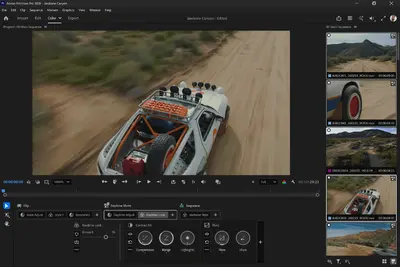
If you edit your own projects, color is rarely a separate phase of the job. You finish the cut, then notice the interview shots don’t match. The exterior is too cool. The interior is too green. One camera is flatter than the other. The client wants a warmer look, but the deadline is tomorrow, and you still need to export, caption, mix, and send the review link. This is the problem Adobe Premiere Color Mode is trying to solve.
Adobe introduced Color Mode in early Spring as a new way to work with color inside Premiere, built around the reality that many editors are also the colorist, finishing artist, producer, and sometimes the person delivering the final file. Since the first beta, Color Mode has gained several new features thanks to beta tester feedback that make that promise more useful in a real timeline: Auto Color, better reanalysis, more flexible Styles, easier grouping, and new tools for shaping midtones, vibrance, and the edges of the frame.
If you are new to Premiere Color Mode, start with the article Why Adobe Rebuilt Color—and Why It Matters for Filmmakers . After you read that article, check out Color Mode versus Lumetri , How to Set Up for Success , and the difference between Adjust and Style operations . These articles help you understand why Color Mode is intentionally different from any other color system you have used and what you can expect from it to help complement your editing skillset.
This article is intended to help you understand what is now shipping in Color Mode (and maybe a little sneak peek at what you can expect in future updates).
A Better First Pass
The first challenge for a one-person editor is often not creating a look. It is getting the footage into the right sequence on a timeline. That may be half the challenge. You may have log footage from one camera, Rec. 709 footage from another, an iPhone insert, and a few shots that were recorded under completely different lighting. Before you can make anything feel cinematic, you need to g



Comments
No comments yet. Be the first to share your thoughts.