Keychron T1 HE Wireless Mouse Lets You Bring the Trackball Closer to Your Thumb
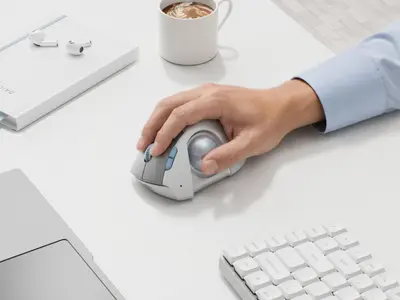
Computer mice ask people with very different hands to get along with the same fixed shape. Trackballs change how you move the cursor, but their ball can still sit just beyond a comfortable thumb reach. Keychron’s upcoming T1 HE Wireless Trackball Mouse adds an adjustment that addresses that mismatch, letting you reposition the ball without replacing the rest of the mouse around it.
The egg-shaped body keeps the arrangement familiar, with a broad palm area, two main buttons, and a scroll wheel above the ball. The white version adds gray button panels and pale blue accents, while black and translucent finishes offer different personalities. This is a right-handed layout, though, so moving the ball doesn’t turn it into an equally accommodating option for your other hand.
Designer: Keychron
Underneath, adjusters let you shift the ball assembly sideways, forward and backward, or up and down. There’s roughly 3mm to 3.5mm of horizontal adjustment and 2mm to 2.5mm vertically. Those aren’t dramatic distances, but the intention is to bring the ball toward your thumb’s resting position, rather than asking you to keep stretching across the same fixed gap.
Once positioned, the mouse stays put while your thumb rolls the 1.34-inch ball to move the pointer. That could make more sense on a crowded desk than repeatedly clearing a path for a conventional mouse. The ball also lifts out for cleaning, giving you direct access to the socket underneath without making occasional cleaning a reason to dismantle the entire mouse housing.
The clicks have their own adjustment, courtesy of Keychron’s MagOptic switches. Optical mode provides one way to register a press, while magnetic mode lets you choose among 11 actuation settings and enables Rapid Trigger. In practical terms, you’re changing when a press registers and resets. You could select an earlier trigger point without needing to replace a switch or take the casing apart.
Those settings live in Keychron Launcher, a browser-based too

Comments
No comments yet. Be the first to share your thoughts.