I tested this Windows 11 optimizer expecting a simple cleanup tool. I got much more than I bargained for
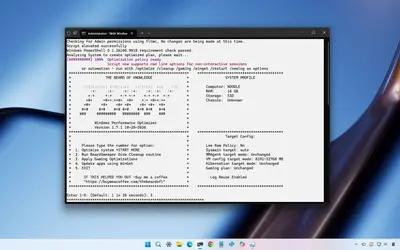
Windows 11 includes many different background services, recommendations, apps, and settings that not everyone wants or needs. TBOK Windows Performance Optimizer tries to debloat that experience by applying dozens of system-wide and per-user changes intended to improve responsiveness, privacy, and gaming performance.
TBOK Windows Performance Optimizer is a free project for Windows 10 and Windows 11 that offers a standalone batch script for home users and separate deployment files for administrators using Microsoft Intune. The script's hardware-aware configuration engine detects the computer's hardware and uses that information to select settings for memory management, storage, services, and gaming.
I like the work behind projects like this, but I wouldn't recommend running a debloating script on your primary computer without testing it first.
What is TBOK Windows Performance Optimizer?
TBOK Windows Performance Optimizer is a Windows configuration and cleanup project developed by The Beard of Knowledge. It combines Registry tweaks, service configurations, scheduled task changes, and app debloating to optimize operating system performance.
The project offers two versions:
Standalone batch script: The TBOKwinOptimizer.bat file is for personal computers, technicians, and anyone who wants to keep the utility on a USB flash drive.
Intune deployment files: A separate collection of files is available for IT administrators managing multiple computers.
The script can apply selected preferences across compatible existing user profiles, including currently loaded profiles, offline profiles, and the "Default" profile.
It also provides summaries showing which changes succeeded, were skipped, or failed. This makes the feature particularly useful for shared computers, custom builders, and administrators managing different workstations.
How TBOK Windows Performance Optimizer works
TBOK uses a hardware-aware configuration engine to determine which settings to apply to Windows 11 or Wi


Comments
No comments yet. Be the first to share your thoughts.