A Quick Look at How Adobe’s New AI Assistant Could Streamline Your Workflows in Premiere
For perhaps the third year in a row, Adobe MAX—the company’s annual creativity conference—had one undercurrent theme that dominated pretty much every keynote, workshop, and conversation.
AI was at the forefront of everything, as it has been for several years now, and despite some promising new features, panels, workflows, etc., in Premiere and other apps that we’ll explore separately, the big news for many might simply be the latest AI tools and features coming to… well… everything.
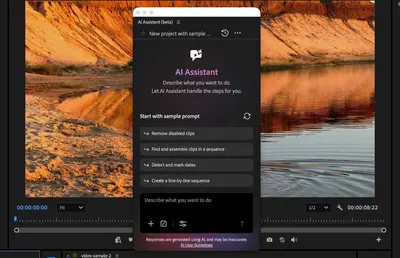
The biggest example from this year’s MAX conference in Miami, Florida, was the introduction of the Premiere AI Assistant, which is, as you might guess, an AI agent assistant in Premiere. Here’s what it is, how it works, and what you should know before deciding whether to try it.
Adobe’s New Premiere AI Assistant
Launched with the noble goal of helping video editors spend less time on repetitive editing tasks and more time on creative decisions, Adobe’s new Premiere AI Assistant makes a lot of sense on paper and could be quite helpful.
Using natural language prompts, you can ask your AI chatbox friend to organize media, assemble an initial edit, or refine picture and sound directly within Premiere. You can add additional reference files or selections from your project to give it context, and create custom skills for workflows you repeat.
All helpful things, but with caveats, of course. The first is that the Premiere AI Assistant is not free; it consumes Firefly generative credits, just like any other prompt request in the generative media toolbar and in Firefly.
There are also many questions about how helpful and useful this AI Assistant might be at launch and in the future.
How Does the Premiere AI Assistant Work?
Before we can really answer how well it works, let’s first look at how it works. As mentioned above, the Premiere AI Assistant is meant first and foremost to be worked with in a conversational workflow.
Here’s how to begin:
Select Window > AI Assistant to open the AI Assistan


Comments
No comments yet. Be the first to share your thoughts.