ACDSee Photo Studio Ultimate 2027: AI features take centre stage
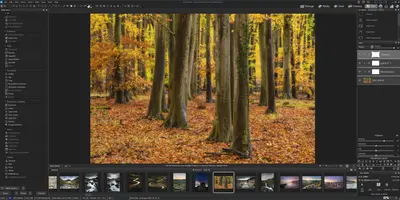
ACDSee Photo Studio Ultimate once again sees its annual update with the release of ACDSee Photo Studio Ultimate 2027. This Windows-only photo editing software remains an enticing option for beginners and enthusiasts, not least thanks to it being all-in-one software where you can enjoy functionality similar to Adobe Photoshop and Adobe Lightroom rolled into a single interface.
This is undoubtedly an interesting way of presenting photo editing software, and ACDSee clearly believes it works because of the annual updates and consistency of approach. In reality, the single interface keeps editing simple and, indeed, streamlined. Of course, there is still a learning curve involved in the software alongside the need to develop familiarity, but the overall presentation remains as simple as ever.
A new version, annually, means more new features than with a generic software update, and this year, like last, sees a strong focus on AI features. But where ACDSee differs from competitors is that there is a strong belief that AI should “never come at the cost of privacy,” with many AI features run locally and others using ACDSee’s own servers where data is deleted after seven days.
The 2027 upgrades feel typical for software developers these days, with that heavier focus on AI functionality. The updates are a mixture of new features and a handful of improvements to existing functionality. And as always, some are more effective and more useful than others.
ACDSee Photo Studio Ultimate: System requirements
Minimum Specifications (Windows) Windows
Operating system
Windows 10 (64-bit editions only), Windows 11
Processor
Intel or AMD processor with 64-bit support, Intel i5 or better processor recommended
RAM
8GB RAM (16GB RAM or more recommended)
VRAM
2GB Video RAM (4GB or more recommended)
Graphics
DirectX 12 compatible graphics adapter
Resolution
1920 x 1080 recommended
Memory
5GB of available hard drive space
ACDSee Photo Studio Ultimate 2027 Media Mode (Image credit: James



Comments
No comments yet. Be the first to share your thoughts.