Page Keeper Holds Books Open Without Tying Up Your Hands
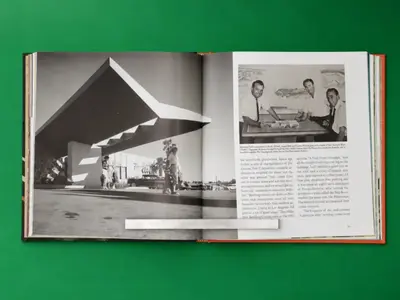
When you need to step away from the book you’re currently reading, you need a bookmark to keep your place (unless you have a very keen memory and know where you left off). Sometimes, though, you still need to keep the book open while freeing both hands, and a bookmark cannot do that job. You could always find something heavy nearby to serve as a paperweight of sorts, but that may not be its primary purpose. Depending on what you use, it could even damage your book or it may not really serve its purpose to keep the book open.
Enter the Page Keeper, a metal page weight designed to help keep your book open, whether you’re using it or just want to display a specific spread. This could be a stocking stuffer or gift for your bookworm friend (or yourself!) this holiday season who sometimes needs to free up both hands and can’t hold a book down. It’s meant for those moments when keeping a book open becomes a task of its own.
Designer: Asher Bezdek
This page holder is made from a single laser-cut piece of metal, so there’s no need for clamps, springs, or adjustable arms. There’s also no complicated setup or need for an instruction manual. You place it on the book spread you need to keep open, then do your thing or leave it on display. The simplicity is part of the appeal. Instead of fastening something to the book, you’re placing a separate object on its pages when you need both of your hands for something else.
This is a useful tool for times when you’re taking notes from your textbook, using a book as a drawing reference, or following a craft guide for your art project or journaling spread. There may also be times when you don’t want or need a bookmark when stepping away and would rather leave the entire spread open. Sometimes pages can close on their own, especially near the beginning or end of a book. That’s particularly frustrating when you’re switching between a reference and whatever you’re working on, or getting up to grab something from across the room. This was
Comments
No comments yet. Be the first to share your thoughts.