VSCO just went desktop. VSCO Studio Pro is a desktop photo editor for batch editing – and yes, it includes those popular film-inspired presets
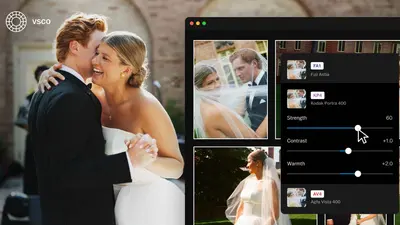
VSCO got its start with its popular mobile app and film-inspired presets, but now VSCO is all grown up and launching a full desktop photo editor. VSCO Studio Pro Desktop is a macOS photo editor built specifically for working with high-volume batch editing.
VSCO says that Studio Pro Desktop is built to be a faster, more affordable photo editing experience designed to keep the editing workflow in a single app. Batch editing is a key focus for the app, which allows photographers to edit as many as 500 photos at one time.
At import, VSCO Studio Pro Desktop supports RAW, JPEG, and HEIC files, with more than 800 cameras from 20 different brands supported at launch. Those files can be imported from the computer, external hard drive, memory cards, or the macOS Photos app. Once inside the app, VSCO says creators can quickly mark their favorites.
(Image credit: VSCO) While VSCO has built the new desktop app from the ground up, the presets that sparked VSCO’s rise to fame remain part of the new app. The desktop version launches with more than 200 presets, including looks inspired by Kodak Portra, Kodachrome, Fujifilm Velvia, and Kodak Tri-X. The desktop app also launches with a new exclusive preset from photographer Joe Greer.
The new desktop app is a non-destructive photo editor that, like longstanding options such as Adobe Lightroom and Capture One , writes adjustments in the metadata to give creators the option to undo or further tweak those adjustments later.
(Image credit: VSCO) At launch, VSCO Studio Pro’s list of editing tools includes:
Exposure
Contrast
Sharpening
Saturation
Highlights and shadows
White point and black point
Clarity
White balance
HSL (Hue, saturation, luminance)
Skin tone
Vignette
Grain
Fade
Crop
Creators will also have access to before-and-after comparisons, zooming to check focus, undo/redo options, and keyboard shortcuts. Once edited, images can be exported with a range of options, including adjusting resolution and quality.
VSCO is launching Stud



Comments
No comments yet. Be the first to share your thoughts.