I tested this detachable screen that instantly brings Android Auto and CarPlay connectivity — and it’s perfect for the Slate Truck
Now that I’ve seen the Slate Truck in person and been inside the $25,000 electric pickup truck, I’m itching to take it out on the road for a proper test drive. In order for Slate to hit that price point, the company stripped the cabin back to the basics — with practically everything being a manual affair. That means crank windows and manual seats, just to name a couple.
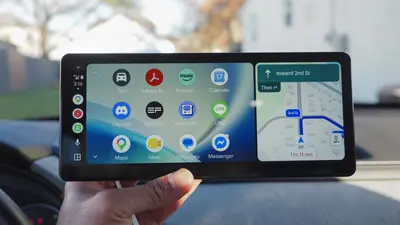
Even more surprising is the clutter-free dashboard, which ditches the massive center infotainment touchscreens I often see in the best electric cars and opts for a simple built-in phone mount. While I appreciate the distraction-free philosophy, going without a proper display for navigation is a tough adjustment for daily driving. That’s exactly where the CarpodGo T4 Plus — which offers seamless CarPlay and Android Auto support — comes in to save the day.
Honestly, if you intend to buy the Slate Truck, it’s easily the first upgrade I’d recommend getting. Here’s why.
The CarpodGo T4 Plus adds a 10.9-inch, 1,000-nit touchscreen to any vehicle with zero permanent wiring, giving you smooth 60fps wireless Apple CarPlay and Android Auto in minutes. Its magnetic quick-release base lets you snap the display off when you park without unplugging cables, while Display Only Bluetooth Mode routes audio straight to your speakers. Don't forget to click the coupon to drop the price down to $229. If you're looking for something smaller, there's also the CarpodGo T4 with an 8.9-inch touchscreen. View Deal
Simple setup, sizable screen
John Velasco / Tom's Guide John Velasco / Tom's Guide John Velasco / Tom's Guide One of the biggest reasons why I recommend the CarpodGo T4 Plus is that installing it is a breeze. In fact, I’d say it’s just as easy as setting up a dashcam — only much quicker. And the best part? It requires zero permanent dashboard modifications or wiring.
While the Slate Truck appears to tuck its 12V DC outlet inside the frunk rather than the cabin, I was able to power the display directly via USB-C in a


Comments
No comments yet. Be the first to share your thoughts.