Final Cut Pro 13 — a deep dive
After a bumpy release — Apple had some internal tech issues — Final Cut Pro 13 has arrived on the App Store. Though the 12.4 point release added support for the new iPhone 18 Pro cinematic mode a few weeks ago, this adds many more features, some of which are pretty important.
This article is a deep dive into the new features available for all users in Final Cut Pro, with a quick look at additions to Motion and Compressor as well. However, I won’t be talking about the MotionVFX tools and thousands of templates in this article, because we’ve got a whole separate article on that right here . If you haven’t subscribed yet, the MotionVFX goodies plus the new Content Hub video and photos may well be enough to swing your decision.
Either way, existing purchasers can read this article without jealousy, as all the other new features discussed in this article are included for all users, subscription or not. Let’s dive straight in.
Disconnected clips and more
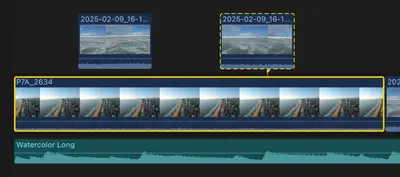
The most obvious change in FCP 13 is that connected clips are more explicitly displayed. When you select a clip on the primary storyline, clips connected to it are shown with a dashed outline, indicating more clearly that they’ll move if the parent moves. (The same dashed outline is also applied to captions, which can be attached to any clip.)
The primary clip is selected, and you can see the dashed outline above the connected clip, but the other two clips here are disconnected
But… disconnected clips? Since that concept probably a little confusing (especially if you’re not a regular FCP user) let’s step back to take a broader look first.
Though the magnetic timeline seems at first to be all about the relationship between clips on the primary storyline, the more important feature is actually how clips above and below that primary storyline are connected to clips on that primary storyline. If the magnetic timeline was just about the primary, it’d just be like making ripple the default edit operation.
Connected clip

Comments
No comments yet. Be the first to share your thoughts.