Logitech Pebble Mouse 2 review: the perfect travel mouse but not a fit for gaming or productivity
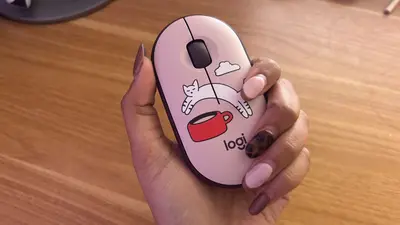
The Logitech Pebble Mouse 2’s is a mouse that's primary purpose is to be portable. It’s the perfect device to take on the go with you but this does come at a slight detriment in the form of its ergonomics and any other flashy features.
It’s slimline at just over 0.98 inches / 25mm tall when sat on your desk but is relatively flat when it comes to overall shape. There’s a small incline, making it slightly taller towards the back end that sits in your palm, but this is in no way comparable to a normal curved mouse shape, which sits snugly and comfortably in your hand, particularly if you opt for a claw grip.
(Image credit: Future) When holding and using the device, the shape is something you have to get used to with time but I barely noticed the difference after a while. Its diminutive size is something that's likely only suited to smaller hands, as it can become uncomfortable using the device for long periods of time for those with larger ones. However, in turn, the size of the mouse is absolutely perfect for those who need a reliable mouse on the go — it's so small it can fit in your pocket without any issue.
You can pick up the Logitech Pebble Mouse 2 in Pink, Black or White. There are also currently two limited designs on offer: the Study Buddy and the Coffee Cat, both created by designer EdgyKatrina. While already adorable in form factor, these limited edition designs take the mouse to the next level in terms of style — as a cat person, the Coffee Cat edition really tugged on my heart strings.
You don’t get any extra buttons on this mouse, featuring just the right click, left click and the scroll wheel, which can also be pressed as a third button. You can reprogram the middle click using the Logi Options+ app that's available on both Windows and Mac.
(Image credit: Future) Contributing to the portability is the silent touch technology, which makes both buttons and the scroll wheel significantly quieter than a normal mouse button. This makes it great to use when


Comments
No comments yet. Be the first to share your thoughts.