Winhanced brings the Xbox 360 Blades dashboard back
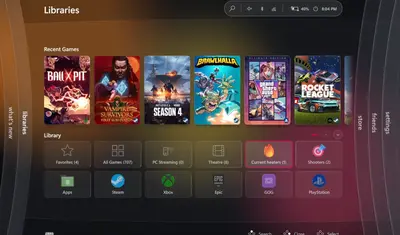
I’ve been raving about Winhanced since I first got my hands on it over a year ago , and the app has only kept hitting stride after stride.
While I haven’t yet covered the major 1.0 update , I wanted to highlight a wild new addition to the launcher, a new interface inspired by the original Xbox 360 dashboard, the one fans famously dubbed "Blades." This update arrives to celebrate Xbox turning 25 years old this past week, a milestone that makes me feel extremely old.
I actually covered something similar in the past, a community project where a fan recreated the Xbox One and Series dashboard in Playnite . I appreciated that project, but I’ve stuck with Winhanced since, largely because of how all-encompassing and easy to use it is. Apparently, I’m not alone in that preference. The addition of a Blades dashboard seemed to make waves online , and I’ve seen plenty of people jump on board and give the launcher a try over the past week or so.
As explained by the developer, the new Blades dashboard works like this: “ In Blades, each part of the app (Home, your libraries, Store, Friends, What's New, Settings) is its own blade, and LB/RB flips between them .”
There's much more to Winhanced than nostalgia
Winhanced brings the iconic Xbox 360 Blades dashboard to modern Windows gaming handhelds, including the ROG Xbox Ally X. (Image credit: Winhanced | Windows Central) I’m honestly impressed by how far Winhanced has come. I couldn’t recommend it enough. I don’t want to touch on 1.0 too much, as it’s worth an entire article in itself, but to give you an idea of just how all-encompassing Winhanced is, it can connect your friends list across almost every platform, offers full Discord integration, includes a store browser that covers Steam, Xbox, and more, supports emulators, tracks achievements, and provides built-in guides for games, among so much more.
If you are interested in trying it, I highly recommend you check it out here . And if you have any questions, the developers are e



Comments
No comments yet. Be the first to share your thoughts.