How to track with Strava and make every sweaty kilometre count
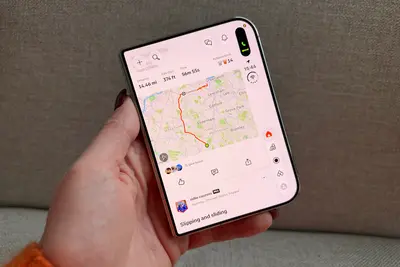
If a tree falls in a forest and nobody is around to hear it, does it make a sound? The same applies to your run. If you don’t upload it to Strava for the little orange map and a few kudos, did your legs even move? Luckily, getting your efforts onto Strava is easy. A top-end Garmin watch strapped to your wrist will do it, but your phone in your pocket will, too. Here’s everything you need to know about tracking your activity with Strava and making those kilometres official.
There are four main ways to get an activity onto the Strava platform: record it directly in the app, sync it from a connected device, import it from another fitness platform or upload a file manually. Which one you use will depend somewhat on the kit you own, but we’ll take you through all four regardless.
Recording with your phone
Your phone is the simplest way to record activity with Strava, and all you need is the Strava app. Tap the Record icon in the navigation bar, and you’re almost there. We say almost because the app defaults to your last activity type. If you went swimming yesterday and you’re cycling today, check the sport icon next to Start before you set off to make sure you’re recording the right activity.
You’ll find extra controls by swiping up on the bottom sheet of the record screen. Auto-pause stops and restarts the clock for you, using GPS or your phone’s accelerometer to tell when you’ve stopped, so traffic lights and coffee stops don’t ruin your pace calculations.
Audio cues let you know when you start, stop and pause, as well as your running splits and Live Segments. You can also pair a Bluetooth Low Energy heart rate monitor and keep the screen on while you record (Android calls this Screen Display).
When you’re done with your activity, tap Finish to open the save screen. Here, you can add a title, photos, a description and privacy settings. Tap Save Activity , and it appears in your feed straight away, with the full details filling in once syncing finishes. Right next
Comments
No comments yet. Be the first to share your thoughts.