MSI EdgeMesa N AI+ review: RTX Spark power comes to Windows on Arm desktops, but there are trade-offs
Nvidia’s RTX Spark platform, powered by the RTX Spark N1X SoC, passed its most difficult test yet last month at the heart of Windows on Arm laptops . Now we get to see how that chip serves as a Windows on Arm foundation for compact desktops.
We’ve got our hands on the MSI EdgeMesa N AI+, a $7,500 RTX Spark mini PC that gives Windows-native creators and local AI trailblazers access to the same powerful 6144-core Blackwell GPU and 20-core Arm CPU that we recently put to the test in the Surface Laptop Ultra , along with a 128GB pool of unified memory and 4TB of storage in our tested config.
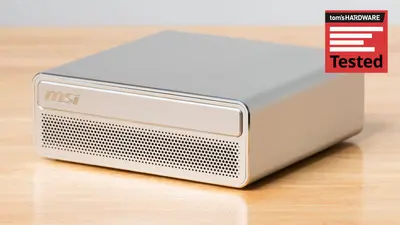
We’ve been testing Nvidia GB10-powered desktop systems for almost a year now in the form of the DGX Spark and friends, and the EdgeMesa N AI+’s design is typical of the breed. It’s wrapped in a slightly hollow-feeling matte aluminum shell with shiny diamond-cut edges and a white plastic back plate.
The design and build quality of this system is a tad underwhelming for the price. It feels nice enough, but It’s hardly a precision-milled statement piece for your desk like a Mac Mini or Mac Studio.
The EdgeMesa draws cool air in through its perforated front panel, which then passes through a dual-fan heatsink with a vapor-chamber base and exhausts through the back panel. The rounded rectangle on the top half of the front panel might look like an optical drive tray, but it’s a purely cosmetic accent.
(Image credit: Future) Around back, the EdgeMesa comes equipped with a 10 Gigabit Ethernet jack, an HDMI 2.1 port, and three USB Type-C 20 Gbps ports with DisplayPort Alt Mode support. A fourth USB-C port is dedicated to the system’s 240 W USB-PD power adapter. The EdgeMesa also has Wi-Fi 7 and Bluetooth 5.4 radios inside.
Even with a wireless keyboard and mouse, three 20Gbps USB-C ports feel a bit skimpy as the sole expansion options on a $7,499 PC that’s positioned as a do-it-all desktop for content creation and gaming. If you need to connect multiple monitors to an RTX Spark via USB-C, t
Comments
No comments yet. Be the first to share your thoughts.