Microsoft gives Windows 11 a new way to check your PC's security
Windows 11 already includes plenty of security protections, but determining whether they're actually enabled hasn't always been straightforward.
Microsoft is trying to fix that with Windows baseline protection , a new feature that checks your PC against a standardized security configuration, identifies missing protections, and can help enable them.
Microsoft is also reorganizing Windows 11's security settings to make important controls easier to find. Here's how the new security experience works and what it could mean for your PC.
Windows 11 can finally check its essential protections in one place
Windows 11 already includes different security technologies, including Secure Boot , virtualization-based security (VBS), Memory Integrity , and stricter driver requirements. The problem is that these protections have traditionally been managed separately across different surfaces.
Windows baseline protection brings these requirements together into a single security standard, allowing Windows 11 to determine whether a device meets all the criteria.
Microsoft has published the first version of these requirements, including:
Security processor.
Secure Boot.
Virtualization-based security.
Memory integrity.
Signed drivers only.
Windows-certified drivers.
Kernel debugger protection.
Vulnerable driver protection.
It's important to note that these are not new features. These are components that have been available for years. The company is only bringing them together under one assessment that can be checked by users, admins, and apps.
Windows 11 can tell you what protection is missing and help turn it on
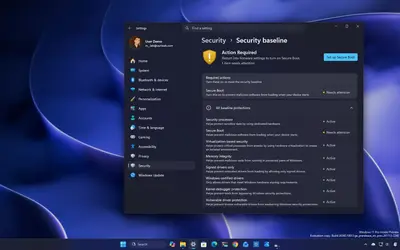
The new baseline protection experience is available through Settings > Security > Security baseline, starting with the release of build 26340.10013 in the Experimental channel for version 26H2 in the Windows Insider Program.
(Image credit: Mauro Huculak) On this page, the operating system can show whether a device meets the Microsoft-maintained security baseline. If it doesn't,


Comments
No comments yet. Be the first to share your thoughts.