Lost your Apple TV remote? There’s a hidden trick that’ll help you track it down in seconds
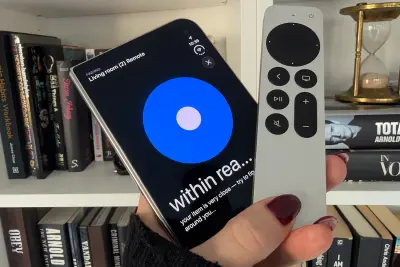
Two things are true about the Apple TV remote. First, it’s lovely and slim; second, its slimness means it slips down the back of the sofa more easily than a letter gliding through a postbox. Sooner or later, you’ll find yourself staring at a paused episode of Slow Horses with no way to unpause it, glaring suspiciously at the dog.
But there’s no need to panic. There are a couple of ways to hunt down a missing Apple TV remote without reaching for a torch and a crowbar, including a handy trick tucked away in your iPhone’s Control Centre. Which one works for you depends on the remote you’ve got and, in one case, the iPhone in your pocket.
Method 1: Ask Siri
This is the easiest (and laziest) option, but we’re certainly not complaining. If you’ve got a Siri Remote (4th generation) paired with an Apple TV 4K (3rd or 4th generation), and Siri AI is switched on, you can simply ask Apple’s assistant for help. Thankfully, Siri is much better than it used to be, so you won’t just get a “Sorry, I didn’t quite catch that” response.
To use this method, activate Siri on your Apple TV 4K and say something along the lines of “Where’s my remote?”. The remote will then play a sound, and you can follow it like a game of hot and cold.
Method 2: Use your iPhone
If you have an older remote or would rather use your phone to search, this method works with the Siri Remote or Apple TV Remote (2nd generation or later).
Your iPhone needs to be running iOS 27.2 or later and you’ll also need to be signed in as the default profile on the Apple TV 4K or be a member of a family group connected to that default profile. If someone else in the house set up the Apple TV box, you may need to negotiate before you can investigate.
Assuming you meet the criteria we just mentioned, you can start the search in three ways:
Use Control Centre. It’s been there since iOS 17, but it’s easy to miss. Swipe to open Control Centre, tap the Apple TV Remote icon, select your Apple TV 4K from the device picker, t
Comments
No comments yet. Be the first to share your thoughts.