Smart and Fast: A Look at Ovide’s New Monitor/Recorder and Video Assist System
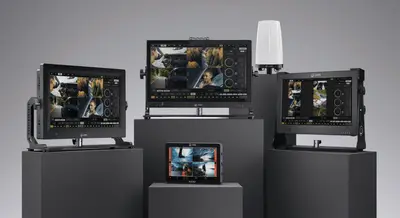
Two new products, two new ways to upgrade your video workflows with powerful tools that can vastly improve the speed and capabilities of your productions, without breaking your budgets. If you’re a solo shooter or part of a small- to medium-sized company or team, your gear makes more of an impact than you might think.
Saving minutes or hours on set can mean real money can be saved, or be made by increasing the amount of coverage, interviews, or deliverables that you can knock out in a day. To help speed up your professional workflows, these new video assist systems from Ovide are here to give your productions a major boost.
Let’s take a look at the Ovide Koko, a multi-cam recording monitor built to find any take in seconds among thousands of clips. And let’s also look at the Ovide Smart M400 LT, a professional video assist tool that brings the Ovide Smart platform to an entry-level price.
The Ovide Koko
Designed to combine high-performance recording, live switching, video assist, and DIT tools in one rugged, production-ready 10-inch monitor, the Ovide Koko helps crews move faster from set to post.
What’s great about this powerful 10-inch recording monitor is that it’s purposefully designed to help simplify demanding film and video production workflows. It does this by combining multi-camera recording, live switching, video assist, and DIT functions, while offering new ways to speed up your production workflows.
Coming from a company with a rich history of supporting camera departments, video assist operators, DITs, and live-production teams, the Koko brings some of the best of Ovide’s decades of experience into a product that can record up to four mixed-format 1080p camera inputs, or one UHD camera, in the industry-standard Apple ProRes format—from HQ to Proxy.
Perks of the Ovide Koko
The Koko also supports recording sources at different frame rates and enables simultaneous playback of four camera feeds. Users can also create a live program with intuitive touchscr


Comments
No comments yet. Be the first to share your thoughts.