Giving my forgotten Android device a desk job
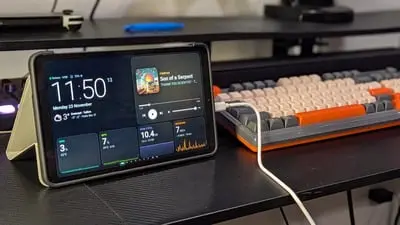
Nick Indge, writing for Ars Technica, turned an old AllDoCube tablet into a desk display with PhoneBox, an open-source program that pairs an Android device with a PC. The tablet shows live performance and diagnostic information from the computer, along with other content. It’s MIT-licensed, runs on Android 5.0 or later, and the app is sideloaded rather than installed from the Play Store.
Setup starts with a single command in a terminal on the PC. The script downloads the software, checks it against the release checksum, and offers to install the Android app on the connected device. The whole install took under a minute over USB. It also prints its own uninstall script before it finishes.
Pages are built from a catalog of 131 free widgets, set up from a web page on the PC. Indge added one that lists his Steam library and launches games with a tap, and another that controls Home Assistant devices. The project is early, and a security advisory covering version 0.9.23 and earlier was published in November.
See more at arstechnica.com and content on GitHub .

Comments
No comments yet. Be the first to share your thoughts.