Skylum Luminar has been updated – and it’s made photo editing so much easier than before!
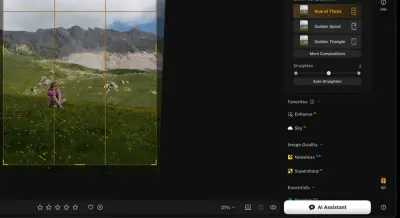
AI-enhanced image editor Luminar brings users major improvements via its Fall Upgrade 2026 – read on for full details
Sponsored. The award winning Luminar from Skylum is constantly enhancing performance and operation to put photographers’ own creativity and human talent first, with its biggest update of the year now available.
Amateur Photographer readers will be aware that there’s already been a lot of boosts and enhancements gifted to users of Skylum’s AI enhanced image editor Luminar in recent months.
These include most recently the launch of Luminar Web, meaning there’s now the ability to edit images with consistency wherever and whenever; on your desktop, smartphone or online.
But, as the evenings draw in, making it the perfect season for photo editing, the good news does not stop, as the Luminar Fall Upgrade 2026 has been released.
So, what’s new this time around?
AI takes the effort out of common editing jobs such as fixing exposure
Scene-Aware Editing
One of the key points about Luminar is that its AI enabled image editing tools, including upgraded Enhance, Atmosphere, Smart Compositions, AI Assistant and Printing options, explore the original photograph first before suggesting any edits.
Its tools analyse the tone, atmosphere, style and setting of the presented image, and, in doing so, Luminar puts the photographer’s own creativity and human talent first.
A recent Luminar survey on AI acceptance among photographers discovered that more than half of them see AI as an important component of their editing routine; so long as they maintain control over the final result.
For this reason, a core approach behind the latest update has been scene-aware-editing, which enables its tools to understand a photo’s tones, light, depth, subject and faces – as well as what kind of scene it is. All this is done with the collective aim of producing photographs worth printing.
Golden mean editing is available to help with composition
Signature printing, and getting


Comments
No comments yet. Be the first to share your thoughts.