Timing review: let an app track what you do
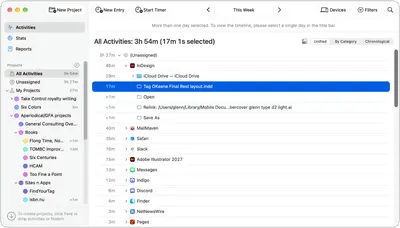
For many years, I have been frustrated by a simple question, one I ask myself all the time: what the hell did I do in my eight hours at work today? I’m a freelancer and micro-publisher, and my time may consist of moments spent each day across a thousand different tasks. This leaves me unable to recall comprehensively what I’ve done.
I finally have an answer in the form of the Timing app : it offers app-driven, document- and dialog-level tracking. It’s not the first or the only such app, but it’s the first I’ve tried, found worthwhile, and stuck with. I now have many months of data about what I do, and it is truly revealing, particularly for the writing portion of my life.
Timing 1 tracks every context switch when you move from foreground app to foreground app, which includes the titles of windows and other identifying details. At the end of the day, I can see how much time I spent and most of what I did within each app.
Timing captures what you do by app using window titles, pathways, and more.
The reason Timing works for me? Powerful rules-based task filtering that, as I’ve set up over time, handles most of the work in letting me see what I’m doing without tediously categorizing pieces of time or individual documents and windows. I can mark time chunks manually or reassign them, but I rarely need to spend many of my precious minutes doing that.
This review isn’t exhaustive—the app has many features I never use, but the subset I describe below has a high value to me.
Identifying what you’re doing
Timing records data about what’s happening in the foreground. While this has limitations, it has generally worked for me across many programs and types of work. Timing pulls titles from documents, tab titles from browser tabs, Terminal job information (often shown in a Terminal window’s title), people from Messages, channel names and DM names from Slack, and paths to files that are open. If you have Timing installed on multiple Macs, it syncs this data. You can manua

Comments
No comments yet. Be the first to share your thoughts.