I upgraded my dual-monitor setup, and lighting made a bigger difference than I expected
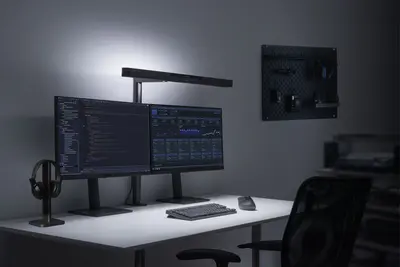
As with many home workers, I’m very lucky to have a dedicated office space that doubles as a PC gaming space when the working day is done, but as the nights draw closer and it gets much darker sooner (at least here in the UK), I’ve been looking for alternative options to keeping my room lighting on to avoid overpowering my eyes.
Enter BenQ, with the manufacturer offering its ScreenBar® Max to check out. With it, I’ve gone from being desperate to get out of the office before it gets dark to never wanting to leave.
Let there be (triangular) light
(Image credit: BenQ) I’ve used multiple screen-mounted lighting options in the past, but it would be fair to say the ScreenBar Max goes further than many of its contemporaries.
I work nine-hour days and often hop back on in the evenings to get additional projects finished, and that means I’ve been looking for something to help me do my best work regardless of time of day.
The trouble is that many of these light bars illuminate one spot on a desk, focusing on a relatively small section of the workspace. That’s particularly troublesome in my use case because I have a dual-monitor setup, meaning there’s more surface area to cover, and they’ve just not been up to the task - until now.
BenQ’s ScreenBar Max is wide enough to allow for minimal glare since it’s not centred on a specific spot, and has done a great job of keeping me focused and locked in well into the evenings.
This is achieved with what BenQ calls its ASYM-TriZone Light and a 36-degree shielding angle, which prevents the light from pointing directly at the user. This means the light stays where you want it to be (across your desk) and not in your peepers.
With up to 700 lux of brightness and a colour temperature that moves from 2700K to 6000K, it’ll automatically adjust to find the ANSI-recommended 1:3 contrast ratio.
I’m also pleased to say that backlighting on offer is very welcome. Too often, working on a desk with a light bar can feel a little like working in a c



Comments
No comments yet. Be the first to share your thoughts.