Control WLED with an Xbox Controller #Hacks #AdafruitLearningSystem @Adafruit
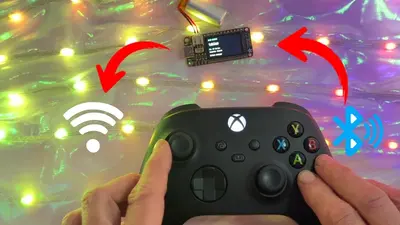
What if you could control all the lights in your house like you’re playing a video game?
Erin St Blaine’s latest project turns an Xbox Wireless Controller into a remote for WLED lighting installations. Switch between projects with the D-pad, change effects and colors with the joysticks, and synchronize multiple WLED projects at once.
The project uses an Adafruit Feather ESP32-S3 TFT running CircuitPython. It communicates with the Xbox controller over Bluetooth and automatically discovers WLED projects on the local Wi-Fi network. Each project flashes twice when selected, making it easy to see which lights you’re controlling.
From the guide:
This project lets you turn your Xbox Wireless Controller into a remote for your WLED projects. Use the joysticks, buttons, and triggers to change lighting effects, cycle through color palettes, adjust brightness, and switch between presets—all without reaching for your phone.
The guide includes the complete CircuitPython code, setup instructions, and a video demonstration featuring glowing mushrooms, an LED fireplace, and crystal lights. The controller works with existing WLED installations, with no changes to their firmware or wiring required.
Check out the full guide: Control WLED with an Xbox Controller
### Adafruit Products ###
– Adafruit Feather ESP32-S3 TFT — the Wi-Fi-enabled controller board with an integrated TFT screen used to send commands to WLED.

Comments
No comments yet. Be the first to share your thoughts.