WhatsApp adds scheduled messages so I can stop spoiling TV shows and otherwise putting my foot in it
When you live in a different timezone to most of your favourite people there are times when you need to be tactical about tapping away on smartphones and sending messages, and you wish others were more tactical when sending them in the other direction.
That’s why I’m thrilled to see WhatsApp finally enable the scheduling of messages – so I don’t have to risk waking people up with my inane ramblings, and I don’t wake up to shocking news from back home.
Black Friday 2026 – Best deals so far
By the same token, when I hold off on sending a message because of the timezone, I often forget to do so entirely! So, as WhatsApp points out, I can “think of it now” and “send it later.”
This would be ideal for me to pop off a little birthday message before I go to bed, so it comes through at 9am UK time instead of 4am UK time. It also might be nice if I’m reflecting on an episode of TV right after watching, but know my pal who also stans for the show mightn’t get to watch until tomorrow morning, for instance.
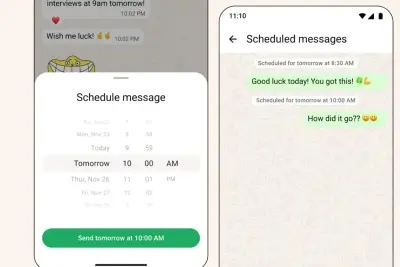
WhatsApp says the scheduled messages works in individual and group chats and works for texts, photos and videos.
“To schedule a message, press and hold the send button and pick the date and time you want it to arrive. It will look like any other message to the person receiving it. You can see all future messages you have lined up, and delete them beforehand if you change your mind,” WhatsApp explains .
“Even if your phone is off or out of battery, your scheduled message will still show up at the time you chose, and it remains end-to-end encrypted like all your personal messages, so no one else can read it, not even us.”

Comments
No comments yet. Be the first to share your thoughts.