Get Your Classic Featurephones Back Online with Yevhenii Antcating's Guide to Bluetooth PAN
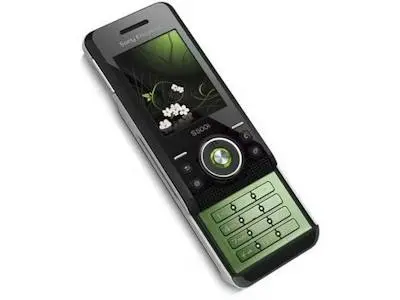
Seismology student Yevhenii Antcating has penned a guide to getting your old featurephone out of the dusty drawer and back online — using a Bluetooth connection to a Raspberry Pi or other more modern device.
"Recently, I bought a used Sony Ericsson S500i," Antcating explains. "I vividly remember getting online on this phone while away from home and downloading games from the Sony Ericsson shop (and the exorbitant mobile data charges that came with it!) But when I tried using it again in 2026, I couldn't connect to the mobile network. Even though I had a SIM card compatible with the phone, 2G had been shut down for some time, leaving no way to access the Internet over a mobile connection. USB wasn't an option either. On many phones of this era, USB tethering was designed to share the phone's Internet connection with a computer, not the other way around."
Classic featurephones like Antcating's S500i are by-and-large built to last longer than most modern smartphones, thanks to user-replaceable batteries — but the same can't be said of their communications capabilities. Many countries have turned off their 2G cellular networks to repurpose the radio spectrum, and depending on vintage an old featurephone may either lack Wi-Fi support entirely or use an outdated security protocol that is rejected by modern access points.
Most, however, supported Bluetooth — and that's how Antcating got the S500i singing again. "Bluetooth supports various profiles, which define how devices use Bluetooth for specific purposes," the student explains. "One of these is Personal Area Networking (PAN), which allows devices to communicate over Bluetooth as if they were connected to an Ethernet network. Although Bluetooth PAN is much less common nowadays, many devices still support the profile."
Antcating's solution revolves around a Raspberry Pi 5 single-board computer's built-in Bluetooth radio — though he notes there's a way to achieve the same using a PC running Microsoft Windows. Command-
Comments
No comments yet. Be the first to share your thoughts.