FotorGear’s $209 Retro Camera brings back the waist-level viewfinder with a 13MP Sony sensor
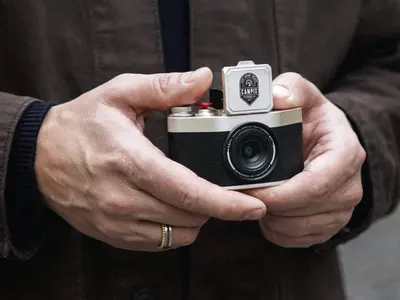
For years, FotorGear’s whole business was convincing your iPhone it was a camera. The Hong Kong brand built clip-on lenses, grips, and a retro photography kit that won Gold for Product Design at the 2024 London Design Awards, all to make a phone feel like something with a film door. With the Campix, the company finally stopped pretending and built the actual camera. It’s a 4.6-ounce (129g) digital shooter with a flip-up waist-level viewfinder, zero screens on the back, and a wind dial you turn between frames. Call it the logical endpoint of a company that kept bolting camera bits onto phones until the phone part became optional.
The design leans hard on the 1950s, especially the Exakta Varex, an East German SLR famous for letting you swap its prism for a waist-level hood. Campix shoots 36-frame digital rolls through a 13MP Sony sensor and a 26mm f/2.2 lens, with a recipe dial holding six film looks and a TTL xenon flash for nights out. The front T-mount takes the very same fisheye, wide, portrait, macro, and anamorphic lenses FotorGear sells for phones, so anyone with a drawer full of them just found those lenses a second home. Retail sits at $209, about a quarter of the $849 Fujifilm X half.
Designer: Fotorgear
A waist-level viewfinder and a dial you have to wind
Flip open the lid on the Campix’s top plate and you find a small display recessed inside a hood, angled so you look straight down at it. That screen is your only window into the camera, showing battery level, the active film look, and how many frames remain on the roll. There’s no rear LCD and no playback, so every shot stays a mystery until it lands in the app. I’ve always loved how waist-level cameras change the body language of photography. You end up bowing toward the scene instead of aiming at it, and people tend to stay themselves when no lens is pointed at their face from eye height.
Every frame follows a little ritual: compose, press the red shutter button, then turn the thumb dial before the

Comments
No comments yet. Be the first to share your thoughts.