Here’s how to make your photos look like high-contrast cinema
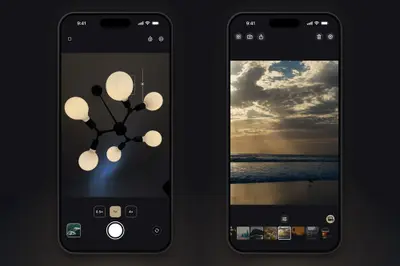
If you’ve got some time to spare to browse through the iOS App Store, try looking for alternatives to the iPhone’s default Camera app, because there are a ton of them available. From the powerful manual controls of Halide Mark III to the wealth of customization features in ProCamera , you’ve got plenty of options to explore.
The latest iOS camera app to be added to the pile is a little bit different, though. It comes from film director Rian Johnson, of “Star Wars: The Last Jedi” and “Knives Out” fame, and his long-time cinematographer Steve Yedlin, and its aim is to bring the pair’s cinematic aesthetics of choice to the photos you snap on your iPhone.
The thinking behind the app, Chromagraph Camera , is that it builds its own photo style right from the raw image. It’s not a filter added on top of what the iPhone has already done to your pictures—it’s a completely different approach to processing images that gives them a distinctive look.
You can pick up the app for yourself from the App Store : It’s not cheap at $12.99, but there are no recurring subscriptions to deal with. Here’s what your money gets you.
How Chromagraph Camera works
The app offers three zoom modes. David Nield
Every time you snap a photo on your smartphone—whether it’s made by Apple , Google, Samsung, or anyone else—the built-in camera app makes certain choices about how the image is processed. What you see in your photo gallery is the result of numerous computational decisions about color, contrast, and brightness.
You can see this for yourself if you take the same shot with phones from two different manufacturers. Of course, you can tweak the images afterward using an editing app and make your own choices about the different characteristics of your photos, but there’s a certain amount of control baked in when it comes to how those photos should look.
With the Chromagraph Camera app, Yedlin and Johnson take over those processing decisions, making your images look—in simple terms—like they



Comments
No comments yet. Be the first to share your thoughts.