Alarm clocks have never been this cool – this is the retro radio to wake up to
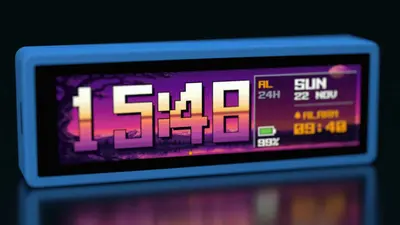
I've seen some interesting additions to a desk setup , but this is up there with the most entertaining. Phosphor is a DIY desk clock that does plenty more than just tell the time, including letting you play blackjack simply by knocking on your desk.
Created by designer Melih Koray, Phosphor is free, open-source firmware for the Waveshare ESP32-S3-Touch-LCD-3.49 development board. It turns the 3.49-inch touchscreen into a multifunctional desktop gadget, with a collection of features and playful extras.
The display has four visual themes, including a vintage vacuum fluorescent display style, alongside looks inspired by the Commodore 64, Amiga and Atari 2600. It's a nice nod to retro technology , with the screen also able to show the time, date and alarm.
(Image credit: Melih Koray ) More than just a clock
Phosphor includes weather information, internet radio with stations organised by genre, and a Pomodoro focus timer that displays a little study room while you work.
There are also several interactive scenes, including an aquarium where you can feed the fish with a tap, a fireplace featuring a sleeping cat and an ocean liner that responds when you tilt the display. There's even a pixel hourglass that can be turned over using the motion sensor.
The standout feature, though, is the blackjack game, called 21. The board's motion sensor detects vibrations from your desk, allowing you to play against a cartoon dealer by knocking once to stand or twice to take another card. You can still use the touchscreen controls if you don't want to disturb anyone nearby.
Getting started
As this is a DIY project, you'll need the specific Waveshare development board rather than simply downloading an app. The firmware is installed through Chrome or Edge using a USB-C data cable, with the developer having tested it on the V2 version of the board. The older V1 model remains unverified.
It's worth knowing that installing Phosphor replaces the board's existing software, including its factory

Comments
No comments yet. Be the first to share your thoughts.