How to Make Your Mic ASMR-Ready: Setup, Sounds, and Recording Tips
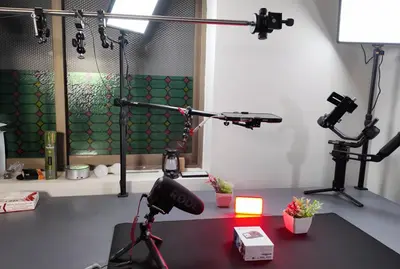
A microphone can become the main attraction in an ASMR video. Gentle fingernail taps on its body, a soft brush moving across its grille, or a slow scratching pattern can create different sounds without needing a collection of expensive props.
The challenge is producing these sounds clearly without clipping, handling noise, or unwanted vibrations. You also need to protect the microphone from damage while experimenting with different textures.
This guide explains how to make your mic ASMR-ready when the microphone itself is the trigger object . You will learn which parts to tap or brush, how to position the recording microphone, how to control sound levels, and how to follow a practical 15-minute recording session.
What Makes a Microphone Suitable for ASMR?
For microphone-focused ASMR, the microphone is both the object creating the trigger and, in some setups, the device recording it. Understanding this distinction helps you choose the right technique and avoid damaging your equipment.
Capture Subtle Sounds Without Distortion
ASMR often relies on quiet details, including light fingernail taps, gentle brushing, and soft scratching. These sounds can become difficult to hear when the recording contains excessive background noise or the input level is too high.
Start in a quiet room. Turn off unnecessary fans, silence notifications, and move away from humming appliances. Record a short sample and listen through headphones before filming a full session.
If a light tap sounds clear but a stronger tap crackles or distorts, reduce the force of the tap or adjust the available recording level. Increasing playback volume will not repair distortion already captured in the recording.
Understand the Difference Between the Trigger Mic and Recording Mic
When the microphone itself is the ASMR trigger, you need to think about two roles:
Trigger microphone: The microphone being tapped, scratched, brushed, or handled to create the sound.
Recording microphone: The microphone c
Comments
No comments yet. Be the first to share your thoughts.