How to Test Microphone on iPhone
Introduction
Ever recorded a video only to hear muffled audio? Or struggled when nobody could hear you during calls? Your iPhone mic might not be working properly. But that doesn’t always mean the hardware is damaged. Simple settings and connection issues can cause similar problems. We have shown some tests in this guide that you can perform to figure out the trouble. For instance, you’ll learn how to check built-in and external microphones. It also covers common issues and their possible fixes. By the end, you’ll know where to look.
Why Your iPhone Mic Might Seem Like It’s Not Working
Don’t rush to blame the hardware! Check a few common causes first. Many mic problems can come from temporary blockages or settings.
App Permissions: iOS blocks microphone access when permission is denied. Check Settings > Privacy & Security > Microphone.
Bluetooth Audio Routing: AirPods or car systems may take over audio input. Check Control Center or temporarily turn Bluetooth off.
Physical Obstructions: Phone cases or protective films may cover microphone openings. Remove the case and clear away any pocket lint.
iOS Input Settings: External devices may change the selected audio source. Check Settings > Sounds & Haptics > Input.
How to Test the Built-in iPhone Microphone
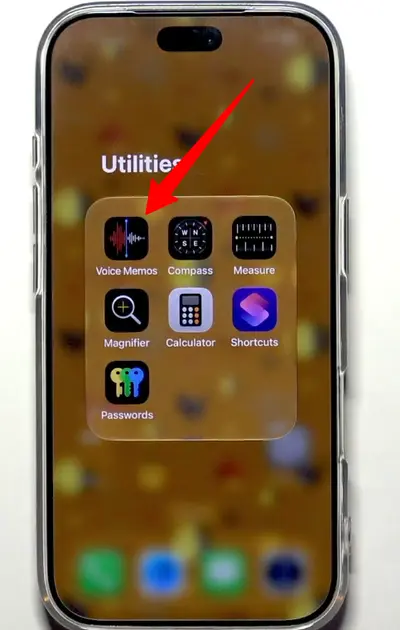
Using the Voice Memos App
Remove your iPhone case to make sure nothing blocks the bottom microphone.
Disconnect Bluetooth devices, including AirPods, before starting.
Open the Voice Memos app and tap the red Record button.
Hold your phone normally and speak clearly for at least 10 seconds.
Speak in different styles, like softly, normally, and then loudly.
Tap Stop and play back your recording.
Listen to your recording. If it’s clear, your built-in iPhone mic is working.
Making a Test Call or Video Recording
You can test your iPhone microphones through calls or videos. FaceTime and voicemail are useful options for this. iPhones have multiple microphones at the bottom, front, and rear. Different micro
Comments
No comments yet. Be the first to share your thoughts.