How to recover your precious data using Stellar Data Recovery
There’s a convenience factor to having all our data in digital form. You can search for old holiday snaps with a keyword, rather than digging old albums out of the loft. But when that digital data goes bad, you’re looking at a major tech backfire.
Stellar Data Recovery will help solve these headaches before they begin, and help keep your precious memory-jogging photos in one piece.
The best bit is Stellar Data Recovery doesn’t mean you need to send your hard drive, laptop or — shudder — entire desktop PC away to a specialist. It’s a piece of software you download on your computer, like an in-house data recovery specialist.
The download is free too, letting you get to grips with the software before spending as much as a penny. You can also recover up to 1GB of data for free on MacOS or Windows, as part of your data recovery test drive.
How to get started
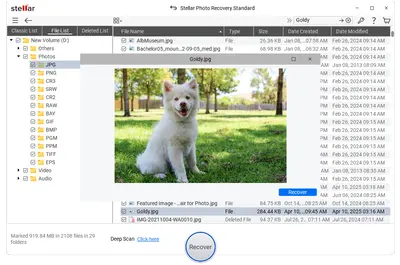
So how does it work? From your perspective as the end user, you simply install the software, then choose a drive to scan for recoverable photos, and other files.
That could be your PC’s own storage, an external hard drive, a memory card or even a digital camera.
Stellar Data Recovery than painstakingly scans through that drive to identify files that can be saved. At the end you’re given a preview of the files, so you can choose which to then copy to another location. By the very nature of how the software works, it’s liable to find a whole heap of stuff you may not need. It’s forensic in its approach.
The interface isn’t massively different to File Explorer on Windows or Finder on MacOS either, to keep everything breezy and familiar. Just click into folders, drag and drop the recovered photos you need.
A hundred nightmares avoided
The sheer amount of stuff Stellar Data Recovery tends to find is in part thanks to the wealth of situations it’s intended to cover. At the simplest end, there are the times you accidentally delete files you didn’t mean to. And that includes data you “permanently” deleted from your
Comments
No comments yet. Be the first to share your thoughts.